Showing posts with label email deliverability. Show all posts

2/27/15

How To Whitelist Us


Make sure we get in your inbox! Scroll down the page to find your email program for instructions to add us to your address book, safe sender list or whitelist.


AOL


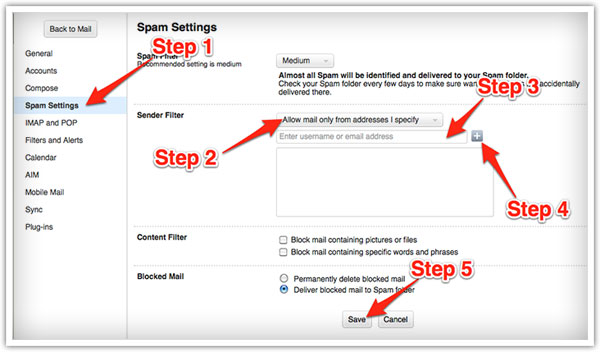
Log into your account and click the “Settings” link.



On the “Settings” page, select “Spam Settings.”

Choose “Allow mail only from addresses I specify” on the drop-down menu.

Enter the sender’s email address.

Click the “Add” button to add them to your sender list.

Click “Save” to save your changes.


Gmail


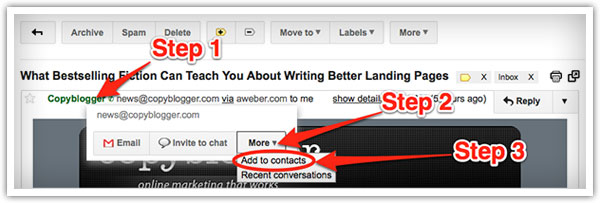
Open the email in your inbox.

Hover over the sender’s name.

Click “More” in the pop-up box.

Select “Add to contacts” to save the sender to your Contacts list.

You can also whitelist in Gmail before opening the email:

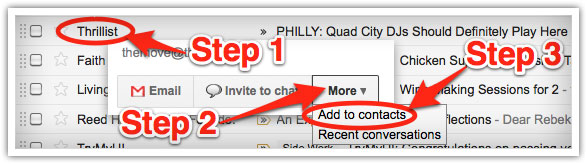
Hover over the sender’s name next to the subject line in the inbox.

Click “More” in the pop-up box.

Select “Add to senders” to save to your Contacts list.


Yahoo


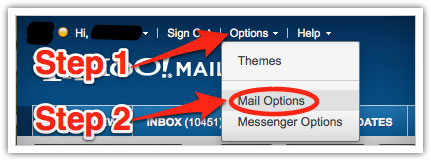
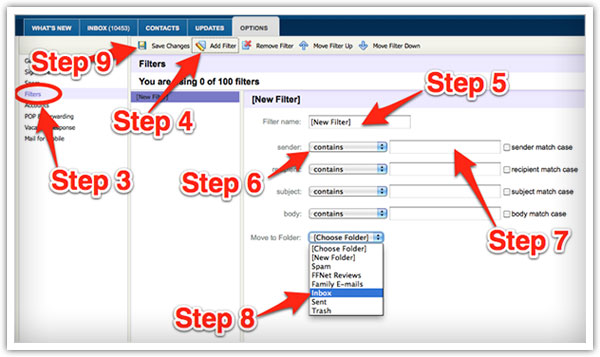
Log in to your account and click the “Options” link.

Select “Mail Options from the drop-down menu.


In the “Options” tab, select “Filters from the left menu.

Click the “Add Filter” button in the top bar.

Type a name for your filter in the “Filter name” field.

Select “contains” in the “sender” drop-down menu.

Type the sender’s email address in the “sender” text field.

In the “Move to Folder” drop-down menu, select “Inbox.”

Click the “Save Changes” button in the top bar to save the filter.


Mac Mail


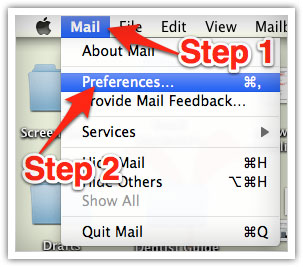
Select “Mail” and “Preferences” from the top menu.

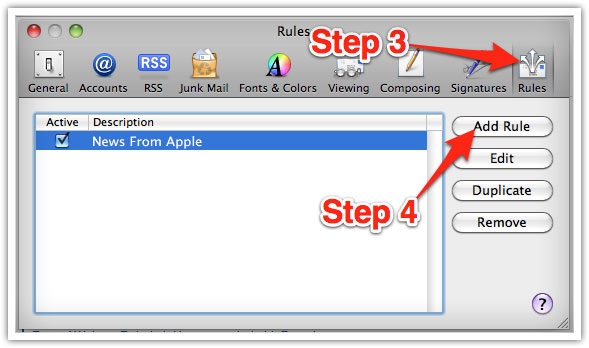
In the “Preferences” window, click the “Rules” icon.

Click the “Add Rule” button.


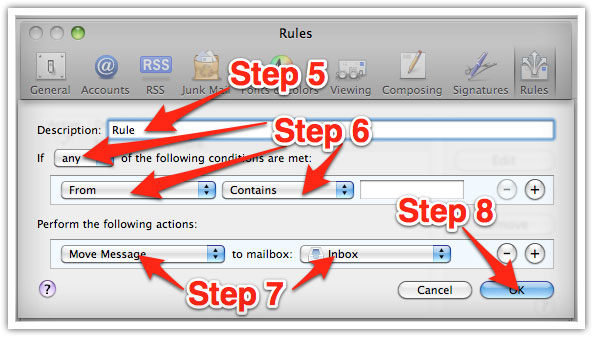
In the “Rules” window, type a name for your rule in the “Description” field.

Use the following settings: “If any of the following conditions are met: From Contains.”

Type the sender’s email address in the text field beside “Contains.”

Select “Move Message” and “Inbox” from the drop-down menus.

Click “Ok” to save the rule.


Outlook 2003 (and higher)


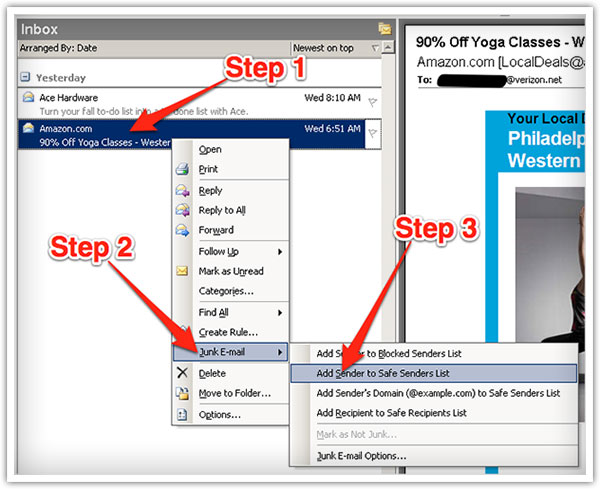
Right-click on the message in your inbox.

Select “Junk E-mail” from the menu.

Click “Add Sender to Safe Senders List.”


Thunderbird


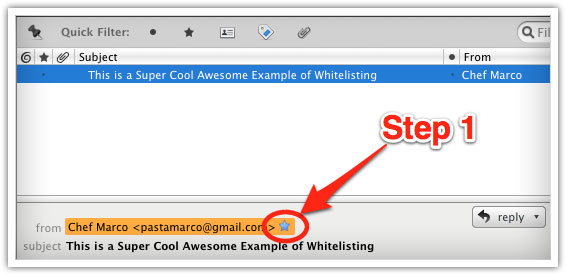
Open the email message.

Click the blue star next to the sender’s name and address to add them to your address book.

Windows Live Mail


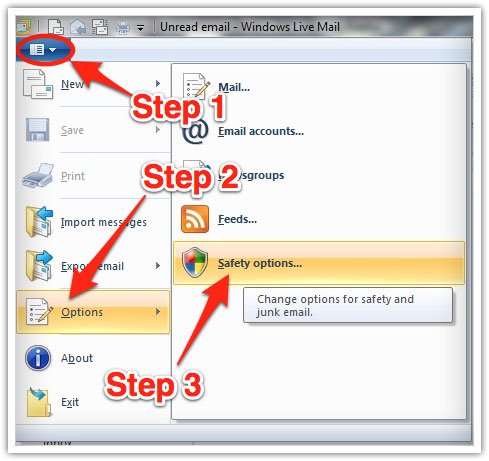
Click the Windows Live Mail icon in the top left corner of the window.

Select “Options” in the menu.

Click on “Safety Options” in the next menu.


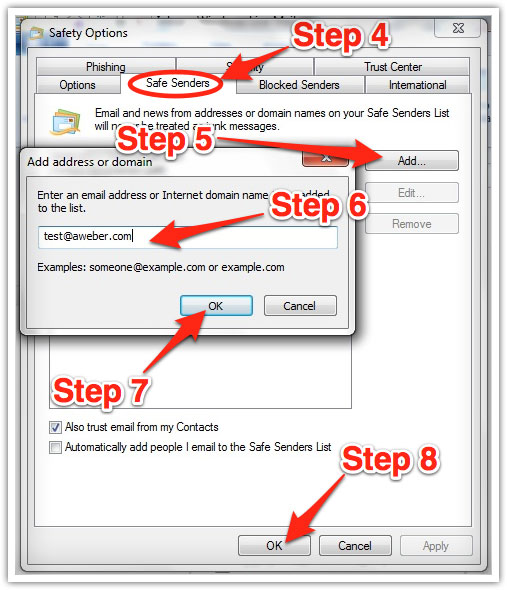
In the “Safety Options” window, click the “Safe Senders” tab.

Click the “Add” button.

Enter the sender’s email address in the new window that pops up.

Click “Ok” to add sender.

Click “Ok” in the “Safety Options” window to save your changes.

Android


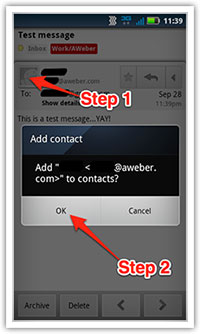
1 - Open the email in your Gmail app. Tap the contact icon to the left of the sender’s name and email address.
Tap “Ok” on the “Add contact” pop-up box.

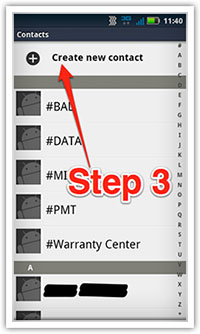
2 - Tap on “Create new contact” at the top of your Contacts list.

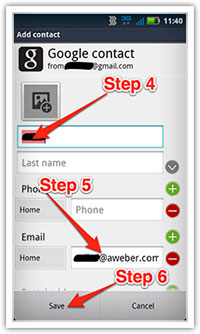
3 - Enter the sender’s name in the “First name” field.
Enter the sender’s email address in the “Email” field.

         1                   2                    3

iPhone


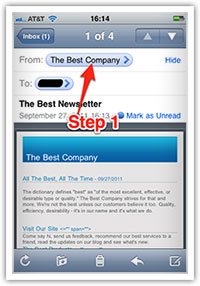
1 -Tap the sender’s name in the “From” line.

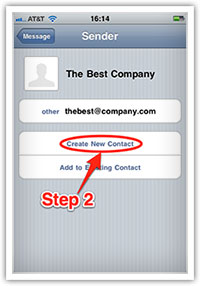
2 - On the next screen, tap “Create New Contact.”

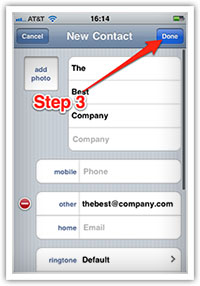
3 - On the third screen, tap “Done” to save the address.

             1                     2                        3 

5/16/09

Email Deliverability Tips

by Tom Kulzer (AWeber CEO)


Email Marketing $19/Month!
Ensuring requested opt-in email is delivered to subscriber inboxes is an increasingly difficult battle in the age of spam filtering. Open and click thru response rates can be dramatically affected by as much as 20-30% due to incorrect spam filter classification.


Permission


Confirming that the people who ask for your information have actually requested to be on your list is the number one step in the battle for deliverability. You should be using a process called confirmed opt-in or verified opt-in to send a unique link to the attempted subscriber when they request information. Before adding the person to your list they must click that unique link verifying that they are indeed the same person that owns the email address and requested to subscribe.


Subscriber Addresses


When requesting website visitors to opt-in ask for their “real” or “primary” email address instead of a free email address like Yahoo or Hotmail. Free emails tend to be throw away accounts and typically have a shorter lifetime than a primary ISP address.


List Maintenance


Always promptly remove undeliverable addresses that bounce when sending email to them. An address that bounces with a permanent error 2-3 times in a 30 day period should be removed from the list. ISP’s track what percentage of your newsletters bounce and will block them if you attempt to continually deliver messages to closed subscriber mailboxes.


Message Format


Usage of HTML messages to allow for text formatting, multiple columns, images, and brand recognition is growing in popularity and is widely supported by most email client software. Most spam is also HTML formatted and thus differentiating between requested email and spam HTML messages can be difficult. A 2004 study by AWeber .com shows that plain text messages are undeliverable 1.15% of the time and HTML only messages were undeliverable 2.3%. If sending HTML it is important to always send a plain text alternative message, also called text/HTML multi-part mime format.


email deliverability


Content


Many ISP’s filter based on the content that appears within the message text.
Website URL: Research potential newsletter advertisers before allowing them to place ads in your newsletter issues. If they have used their website URL to send spam, just having their URL appear in your newsletter could cause the entire message to be filtered.

Words/phrases: Choose your language carefully when crafting messages. Avoid hot button topics often found in spam such as medication, mortgages, making money, and pornography. If you do need to use words that might be filtered, don’t attempt to obfuscate words with extra characters or odd spelling, you’ll just make your messages appear more spam like.


Images: Avoid creating messages that are entirely images. Use images sparingly, if at all. Commonly used open rate tracking technology uses images to calculate opens. You may choose to disable open rate tracking to avoid being filtered based on image content.


Attachments: With viruses running rampant and spreading thru the usage of malicious email attachments many users are wary of attached documents. It’s often better to link to files via a website URL to reduce recipient fear of attachments and reduce the overall message size.


CAN-SPAM Compliance


The January 2004 Federal CAN-SPAM law introduced a number of rules regarding the delivery of email. It’s important you have your legal counsel review your practices and ensure you are in compliance. The two most important rules include having a valid postal mail address listed in all commercial messages and a working unsubscribe link that is promptly honored to remove the subscriber from future messages.


Reputation


Reputation services are often used by large ISP’s as a way to vet email senders regarding their email practices and policies. Businesses listed with these services are then given less stringent filtering or no filtering at all. Several reputation services are:

* http://www.isipp.com/iadb.php


Relationships And Whitelisting


Contact with major ISP’s and email providers is essential in letting them know about your requested subscriber email. Many large providers such as AOL and Yahoo have specific whitelisting programs and postmaster website areas to ensure your email is delivered as long as you meet their policies and procedures in handling your opt-in list.


Email deliverability is about ensuring requested opt-in email is delivered to the intended recipient. While no single tip will enable you to get 100% of your email delivered each one utilized as a group can go a long way to reaching that goal.


Automate Your Email Marketing with AWeber

Social Media Marketing Courses Online

The 4th and Final LIVE #SiteSell's Social Media Marketing Courses Online  Presents Event Featuring David Amerland, Martin Shervingto...